
Create courses with your own team
Learning specialists build lessons from ready-made blocks, video and assessments. Update training as your products and processes change, without waiting for developers.
Create courses in the builder or with AI. Connect learning to competencies and individual development plans, assign mentors and track employee development.
Learning specialists build lessons from ready-made blocks, video and assessments. Update training as your products and processes change, without waiting for developers.

Set target competency levels, stages, tasks and deadlines in an individual development plan. Employees know their next step, and mentors know what to review and when.

Reports show completed and overdue tasks, progress by stage and work awaiting review. Discuss specific difficulties with your team, beyond completion percentages.
Set the topic, audience and learning level before generation. Edit the proposed outline, then let AI prepare lessons and quizzes. The draft remains editable in the same course builder.
Assessment, target levels, courses and work assignments are linked in a development plan. Managers can explain why training was assigned and what result is expected.
Employees submit work, receive comments and revise it when needed. Set a sequence of reviewers: a mentor, manager, HR specialist or expert.
Development plans support branching based on test results, course completion or a reviewer’s decision. Add the right task or skip a stage that has already been mastered.
Build lessons with text, video, quizzes, surveys and interactive tasks. Use matching, sequences and scenarios with choices. Import existing SCORM 1.2 / 2004 packages into the platform.
See it in a demo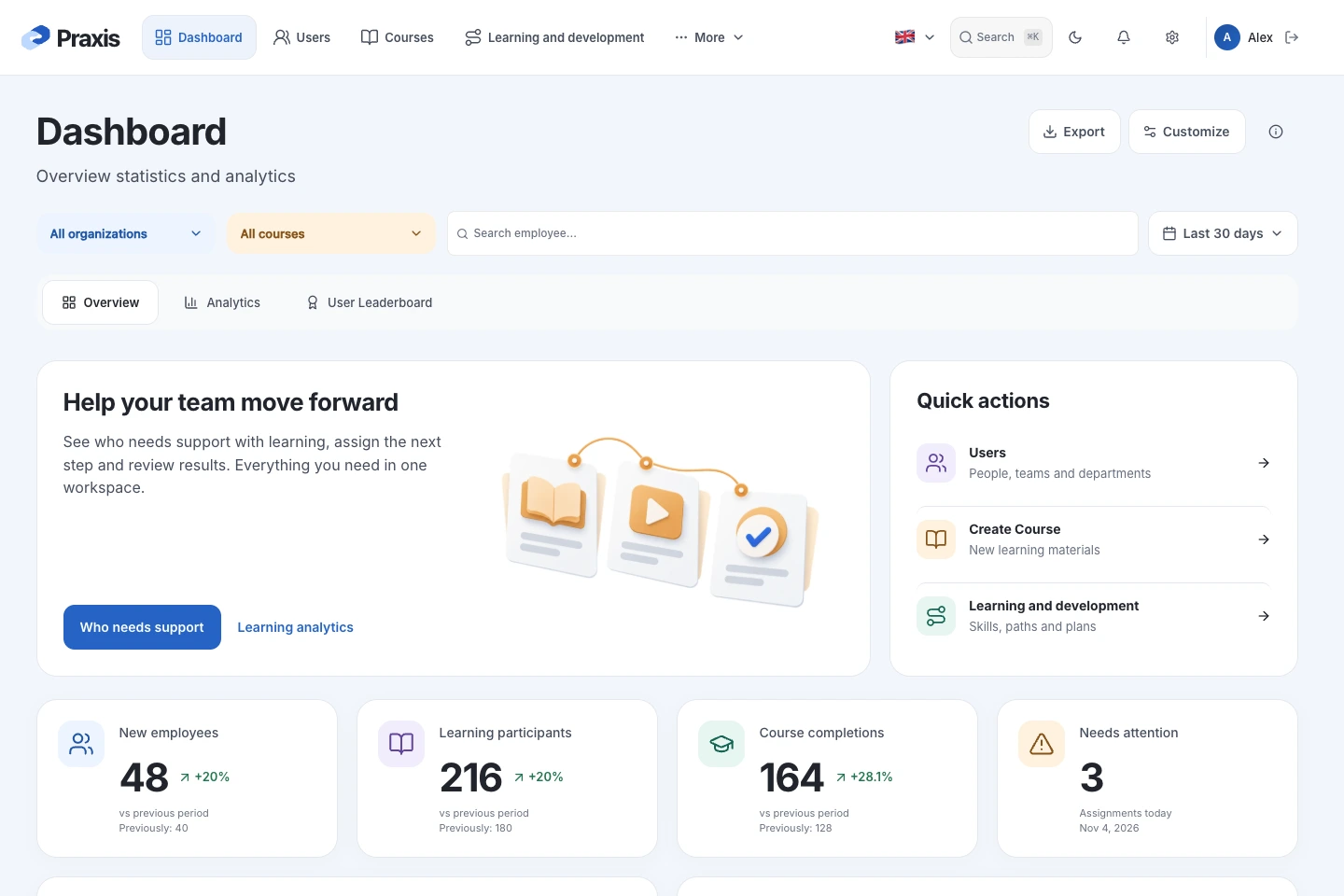

Included with Praxis LMS
With Praxis LMS, you receive an additional employee course: 200 modules featuring interactive lessons and digital hygiene simulators.
Passwords, MFA, phishing, and safe handling of data and devices. Assign learning to groups and help employees build secure habits.
Link, email and attachment checks, Wi-Fi selection, browser history analysis and scammer dialogues. Adapt tasks, answers and explanations to your company policies.
Schedule training email campaigns for employee groups. Configure emails and landing pages, use AI to draft templates and track opens, clicks and data submissions.
Track course completion and test results. Review training alongside phishing campaign results to choose topics for further practice.
Build a program for the first weeks: company courses, work assignments, deadlines and mentor sessions. Assess readiness for independent work through plan results.
Identify competencies needed for the next role. Create a plan with target levels, learning and assignments reviewed by a mentor or manager.
When launching a product or changing a procedure, update the course, add questions and assign it to the relevant teams. Use results to identify topics that need further explanation.
Create programs, assign development plans and track employee development across departments.
Agree on goals, review work assignments and discuss progress based on results.
Turn company knowledge into courses and interactive tasks, and update materials independently.
Run Praxis LMS on your company’s infrastructure and connect it to your existing systems. Corporate accounts, learning results sent to HR, webinars and calendar events help make learning part of daily work. Connections are configured and tested with your systems; data, exchange direction and access are agreed before launch.
Define the audience and outcome: onboarding, product training or competency development. Use your materials to agree on a demo scenario.
Explore the builder, program assignment and a development plan with tasks, deadlines and a mentor. Agree on corporate sign-in, content migration and hosting.
Employees complete learning and submit tasks; mentors review their work. Together, review the report and prepare rollout to other teams.
Need technical details?
Let's discuss your architecture and requirements.
A program combines courses into a sequence. A development plan adds a personal goal, stages, deadlines, work assignments and a mentor. Employees can submit results, receive feedback and complete several review stages.
Yes. The builder is designed for learning specialists and experts: add materials, quizzes and interactive tasks without programming. During the demo, we will build a sample lesson using your content.
SCORM 1.2 / 2004 import is supported. We will test your sample packages for launch, completion and result reporting. Other materials can be used when building lessons.
No. Courses and plans can be created manually. AI is an optional tool for drafts and translation; the provider is selected separately, including a local model.
The platform supports organizations, departments and teams, access controls and reporting by structure. We will demonstrate how to organize learning across your companies and departments.
We will follow your scenario: build a lesson, assign a plan, submit a task to a mentor and open the report. Pricing depends on users, hosting, integrations and implementation scope.
LDAP / Active Directory supports corporate account sign-in and importing employees from the directory. HR API connections include handlers for sending course completion results to PeopleForce, Hurma and 1C:ZUP, plus a generic webhook. An HR event can trigger learning assignments during onboarding. For Praxis HRM and other systems, we agree on formats, access and any required development; the connection is verified against your configuration.
Connections to Zoom, Webex and Microsoft Teams are provided for webinars; meeting creation and attendance data are tested with the selected service and your account. An iCalendar / ICS subscription displays LMS events in a compatible calendar: it is read-only, not two-way editing. Email notifications use your configured SMTP server; SMS uses SMSTraffic when the provider is connected.
The platform implements connections to OpenAI, Google Gemini, DeepSeek, Perplexity and local LM Studio. Administrators choose the provider and model; a local model requires company computing resources. Existing courses can be imported as SCORM 1.2 / 2004, with compatibility and result reporting checked against your package.
Praxis LMS lets you create courses and security exercises, assign learning and assess knowledge. Entry Point is a separate mission-based game for employees, CISOs, SOC teams and developers. SCORM 1.2 supports result exchange; we validate the combined workflow during integration.
An additional employee course with 200 modules of interactive lessons and digital hygiene simulators. Phishing campaigns and the security exercise builder are capabilities of Praxis LMS; their setup and deployment scope are agreed separately.
Build a lesson, create a development plan and review an assignment as a mentor. See what employees and managers see at each stage.